Distinct Errors SMP • Staff guide
Hello, my silly staff. In this guide, I’ll teach you some very interesting staff mechanisms and how to moderate efficiently on the SMP.
I. Your permissions
Section titled “I. Your permissions”You have the right to do the following things:
Inventory related :
Section titled “Inventory related :”- You are allowed to look at inventories.
- Though you are not allowed to modify.
Moderation related :
Section titled “Moderation related :”- You are allowed to kick and ban.
- You can also teleport to other players without using /tpa.
Anti-grief related :
Section titled “Anti-grief related :”- You are allowed to inspect blocks that have been placed, destroyed, etc.
- You can also look up containers (who took what item and who deposited items).
- You cannot revert a grief.
Whitelist related :
Section titled “Whitelist related :”- You are allowed to whitelist players.
Sanity related:
Section titled “Sanity related:”- You are allowed to look at other people’s howIFeel.
- You are as well allowed to either remove or add sanity to other players.
II. Whitelisting
Section titled “II. Whitelisting”The whitelist process is quite easy.
1. The person joins the server and verifies itself.
Section titled “1. The person joins the server and verifies itself.”For this, the new member will use APPY, and the application results will be shown in this channel.
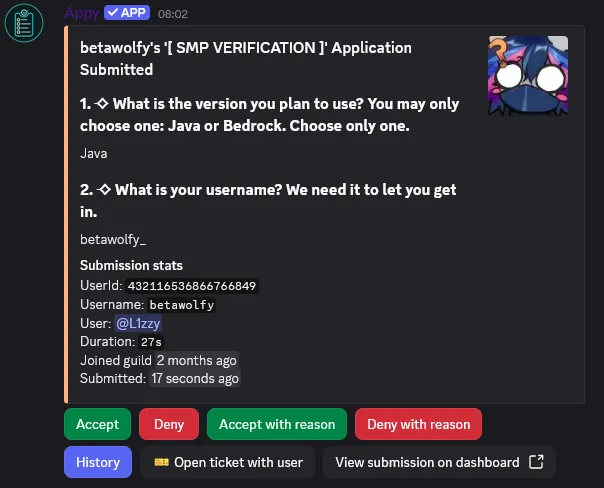 Exemple of an application.
2. Checking if the verification application is filled correctly.
Section titled “2. Checking if the verification application is filled correctly.”Both things you need to check:
a. It can be only one version.
Section titled “a. It can be only one version.”It can happen that the person just says “Both” instead of “Java” or “Bedrock”.
If it happens, you have to Deny with reason with the reason:
Denied - Please state one version you will use.b. The username.
Section titled “b. The username.”A Minecraft username CANNOT contain spaces, nor can it exceed 16 characters.
Be sure to deny any members not respect this.
3. Is the person good? great! let’s approve it!
Section titled “3. Is the person good? great! let’s approve it!”Press Accept with reason and paste the following:
██████████ 100% You have been accepted and whitelisted. Be Sure to read the Wiki and guides. Have a nice journey in our SMP!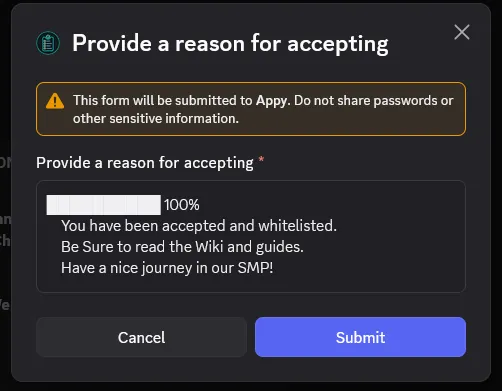 Small exemple of accepting an application.
4. Let’s whitelist them!
Section titled “4. Let’s whitelist them!”Once those steps are done, it is time to connect in-game and to make some commands.
In order to whitelist someone, you must do the following command:
/whitelist add <nickname>
NOTE: If the user wants to play on Bedrock, you must add a . before the nickname.
/whitelist add .<nickname>
If the member cannot connect, it means their nickname is wrong.
III. Moderation
Section titled “III. Moderation”As a staff, you need to assure that rules are respected and that the server is a nice place to be in. Everyone is welcomed, but if someone is being toxic, you need to take action.
1. Warn system
Section titled “1. Warn system”There are not “official” warn system in the SMP, but if you feel a problem doesn’t require a kick or more, do privately warn the player. You can do it by DMing them, or by using the command /msg <nickname> <message> in-game.
2. Kicking and banning
Section titled “2. Kicking and banning”If the problem is more serious, you can kick or ban the player.
To kick a player, you can use the command:
/kick <nickname> <reason>
To ban a player, you can use the command:
/ban <nickname> <reason>
Be sure to not forget the . if the player is a Bedrock player.
3. Teleporting
Section titled “3. Teleporting”If a player has a problem or need help from a staff, you can teleport to them by using the command:
/tp <nickname>
4. Griefing
Section titled “4. Griefing”If you see a grief, you can inspect the blocks and containers to find out who is the culprit.
You can use the following commands:
/co i and clicking on a block to inspect it. you can also click on chest, barrels, etc. to see who took or deposited items.
/co lookup time:<time> radius:<radius> to see all the actions that happened in a certain area and time. recommendin to use it at the time you check minus 1 day and a radius of 10 or 20 blocks.
5. Inventory checking
Section titled “5. Inventory checking”If you see a player doing something suspicious, you can check their inventory by using the command:
/invsee <nickname>
If, for exemple, you see them with a lot of precious ore while mining, you can check if they are using x-ray. Or, if they have a excessive amount of creative-only items, they may be cheating or stealing.
THOUGH! Admins can gift some creative items, but only test blocks or lights blocks; if a user has a command block, for exemple, it is a sign of stealing in a admin chest.
IV. Sanity
Section titled “IV. Sanity”As staff, you are allowed to ‘mess’ with other people’s sanity. You can either add or remove sanity to other players, and you can also look at their howIFeel.
1. Looking at howIFeel
Section titled “1. Looking at howIFeel”In order to look at someone’s howIFeel, you can either do that:
When someone sends a howIFeel, it will be displayed:
- One, for all staff online (or people with the
de.howifeel.viewpermission) in the game chat. - Two, in the #howifeel channel in the discord.
2. Adding or removing sanity
Section titled “2. Adding or removing sanity”To edit someone’s sanity, you can use the following commands:
/sanity add <nickname> <amount> <reason> to add sanity.
/sanity remove <nickname> <amount> <reason> to remove sanity.
3. How to choose the amount of sanity to add or remove?
Section titled “3. How to choose the amount of sanity to add or remove?”Here is the amount to add/remove depending the context:
+20 (or -20) if this is family related ‘(e.g. “I found my papa again!!” worth +20 points, while “PAPAAAAA WHERE ARE YOU…” worth -20 points).’
+10 (or -10) if this is a good (or bad) moment in the SMP ‘(e.g. “I found a new friend!” worth +10 points, while “I lost all my items…” worth -10 points).’
+5 (or -5) if this is a neutral moment in the SMP ‘(e.g “I built a new house!” worth +5 points, while “I got lost…” worth -5 points).’
Note that this is stackable. meaning that if someone says “I found a new friend and I lost all my items”, you can do math: +10-20, which will give a total of -10 points.